YTDLnis Downloader v1.9.1 [Final]
Requirements: 7.0+
Overview: YTDLnis is a video/audio downloader for Android using yt-dlp .
Features:
● download audio/video files from more than 1000 websites
● download playlists or multi select items
● queue downloads and schedule them by date and time
● use custom commands and templates or go full terminal mode
● cut videos based on timestamps and video chapters (This yt-dlp feature is experimental on the original project)
● remove sponsorblock chapters
● embed subtitles/metadata/chapters etc
● modify metadata such as title and author
● split item into separate files depending on its chapters
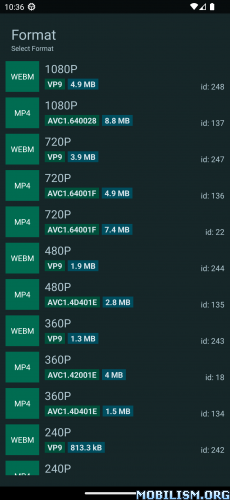
● select different download formats
● process multiple items before download
● quick share card right from the share menu
● search or insert a link from the app
● log downloads
● re-download cancelled or failed downloads
● incognito mode when you don’t want to save a download history
● download multiple items at the same time
● change preferred audio/video formats and qualities
● Material You interface
● MVVM Architecture w/ WorkManager
● easy to use
★ Untouched apk with Original Hash Signature
★ Certificate MD5 digest: 429d0c6315d2f99650f66cc44cf5a794
★ No changes were applied
➡ Languages: Full Multi Languages
➡ CPU architectures: arm64-v8a, armeabi-v7a, x86, x86_64
➡ Screen DPIs: 120dpi, 160dpi, 240dpi, 320dpi, 480dpi, 640dpi
What’s New:
Embed Lyrics
Embed lyrics for audio downloads. New section where u can search lyrics synced or not synced from lrclib.net. Automatic playback of the audio and the lyrics. You can also adjust the timing if its off. You can also save the lyrics .lrc file as separate.
This was long ago in my todo.
Burn Subtitles
Built internal yt-dlp plugin that burns subtitles for video downloads. Needs save subtitles and/or save automatic subtitles to be checked.
Failed data fetches in home screen
App will store all queries or urls it failed to query so u can retry them again, or just jump straight to the download card without fetching data.
Add a welcome screen
Asks necessary permissions, tells user to read the guide. also u can restore backups straight from it. If backup had custom download paths it also asks to regrant permission for them so downloads won’t fail. By the way ytdlnis.org is now full with guides on how to use the app.
Temporary files settings screen
Temporary files are now clearly laid out and you can delete them separately or delete all. Now separated as
unfinished downloads
info jsons
yt-dlp cache
temporary configurations
downloaded apks
Other stuff
Bash shell in Terminal, fix text wrapping etc
New download queue design
Make app upload files to the cloud if download path is an external provider (like nextcloud)
Add translator credits in the settings
Add incognito icon when generating cookies bottom sheet
reworked setting screen for updating yt-dlp and app
Increase notification update interval for live notifications
Inject cookies to newpipe extractor so it data fetches private videos
Long pressing update formats ignores info json, also when toggling format source
Add select range dialog in the home screen
Add dialog which choosing items to share / open in the history fragment
fix The textfields for cuts uses the regular keyboard instead of numeral one
fix Pressing crop when the item data is not fetched and you press update, it opens the cut sheet instead of crop
Make app properly cancel yt-dlp jobs like update formats, data fetching
add sort by Author, Duration, Title, and Date in download multiple bottom sheet
add independent preferred format size for audio, thanks @Phoenix14
configurable history card quick action thanks @pheonix14
add ffmpeg preset preference for app’s internal plugins like burnsubs, compatble recorder
add copy urls in home screen top menu
add search results as backup category
make auto start of bgutils server in main activity instead of app so other apps wont autostart it
add webview to logs so it handles bigger logs
add separate process for incognito mode in webview, also now login persists and still generates proper cookies so regenerating is quick and easy
add color highlighter to command templates screens
keep screen awake when download queue has items shown
Copy Links of Multiple item in Download History screen
Add setting toggle to disable automatic clipboard check on app launch
Made compatible mode toggle as an internal plugin for better conversion
Auto update yt-dlp in the update checker background work if user checked it
Add terminal command history tracking
Add filesize approx identifier in formats with ~ in front of filesize
Rework app locales so now it shows all locales
Fix Configuration backup ignores selected SD card directory and crashes
Fix Previously paused downloads automatically start downloading after a new download finishes. Now paused items stay there until u press resume all
and other small stuff, idk
This app has no advertisements
More Info:https://github.com/deniscerri/ytdlnis
Download Instructions:
arm64-v8a, armeabi-v7a, x86, x86_64:
Mirrors:
arm64-v8a:
Mirrors:
![Stark Fitness: Simply Train v1.5.0 [Paid]](https://apkmagic.com.ar/wp-content/uploads/2022/12/24/Stark-Fitness-Simply-Train-v150-Paid.webp "Stark Fitness: Simply Train v1.5.0 [Paid]")
![iScanner – PDF Scanner App v5.24 [Paid] [Patched] [Root]](https://images.mobilism.org/?dm=GJMEW6IF "iScanner – PDF Scanner App v5.24 [Paid] [Patched] [Root]")
![Weather and Radar USA – ad free v2021.26 [Paid] [Mod Lite] APK](;https://apkmagic.com.ar/wp-content/uploads/2021/07/16/Weather-and-Radar-USA-–-Storm-alerts-–-ad-free.png "Weather and Radar USA – ad free v2021.26 [Paid] [Mod Lite] APK")
