YouTube Music ReVanced Morphe v8.30.54 [anddea mpp v4.1.0] Requirements: 8.0+ Overview: YouTube Music ReVanced is a patched version of YouTube Music app with adfree music, background play capability and more.
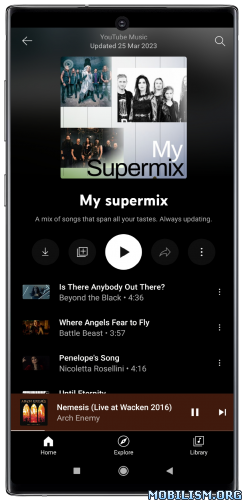
YouTube Music is a new music app that allows you to easily find what you’re looking for and discover new music. Get playlists and recommendations served to you based on your context, tastes, and what’s trending around you.
A new music streaming service from YouTube ● This is a completely reimagined music service with official releases from your favorite artists.
Find the music you want ● Easily find the albums, singles, live performances, covers, and remixes you’re looking for. ● Don’t know a song’s name? Just search for the lyrics or describe it.
Discover new music ● Get music recommendations based on taste, location, and time of day. ● Use “The Hotlist” to keep up with what’s trending.
Uninterrupted listening with Music Premium ● Listen ad-free ● Don’t worry about your music stopping when you lock your screen or use other apps. ● Download your favorites or let us do it for you by enabling Offline Mixtape.
Get one free month of Music Premium to listen ad-free, offline, and with your screen locked, then pay just $9.99 a month. Existing YouTube Red or Google Play Music members and users of either service who have already received a 30 day trial are not eligible. Monthly charges auto-renew for Music Premium membership outside of trial periods.
★★★ YouTube Music ReVanced Morphe compiled by derrin ★★★
➤ ReVanced anddea mpp v4.1.0 – Bug Fixes ● YouTube Music – Settings: Import/Export settings did not work (46e0b15)
– Features ● YouTube Music – Settings: Add search to preferences (b0fa388)
➠ It’s based on the latest ReVanced Morphe anddea mpp features, bug fixes and optimizations for YouTube Music app (with Return Youtube Dislike, SponsorBlock and ReVanced Extend settings).
✅ Bitrate default value ✅ Bypass image region restrictions ✅ Certificate spoof ✅ Change share sheet ✅ Change start page ✅ Change version code ✅ Custom branding icon for YouTube Music ✅ Custom branding name for YouTube Music ✅ Custom header for YouTube Music ✅ Dark theme ✅ Disable Cairo splash animation ✅ Disable QUIC protocol ✅ Disable dislike redirection ✅ Disable edge-to-edge display ✅ Disable forced auto audio tracks ✅ Disable forced auto captions ✅ Enable debug logging ✅ Enable landscape mode ✅ Flyout menu components ✅ GmsCore support ✅ Hide account components ✅ Hide action bar components ⚠️ “Replace Samples button” is not supported in this version. Use YouTube Music 6.29.59 – 8.28.54. ✅ Hide ads ✅ Hide layout components ✅ Hide player overlay filter ✅ Navigation bar components ✅ Player components ✅ Remove background playback restrictions ✅ Remove viewer discretion dialog ✅ Restore old style library shelf ✅ Return YouTube Dislike ✅ Return YouTube Username ✅ Sanitize sharing links ✅ SponsorBlock ✅ Spoof Wi-Fi connection ✅ Spoof app version for lyrics ✅ Translations for YouTube Music ✅ Video playback ✅ Watch history ✅ Visual preferences icons for YouTube Music ✅ Settings for YouTube Music
➠ Stock Icon without the Custom branding patches
➡ Package name: app.rvx.android.apps.youtube.music ➡ Languages: Full Multi Languages ➡ CPU architectures: arm64-v8a, armeabi-v7a ➡ Screen DPIs: 120dpi, 160dpi, 240dpi, 320dpi, 480dpi, 640dpi
➠ Non-Root variant, MicroG Services (GMSCore) from links below is required
➠ How to Install: • Install MicroG Services (GMSCore) • Then install Youtube Music ReVanced Morphe • Open Youtube Music ReVanced Morphe • Log in to your Google account
⚠ To prevent playback issues go to Settings ➤ RVX ➤ Miscellaneous and Switch on / enable “Spoof video streams”; press on “Default client” if you want to select from the list a different default client for spoofing.
⚠ If buttons in the player are not showed ➠ clear cache and data ➠ launch it ➠ restart to load the layout normally;
⚠ To “spoof app version for lyrics” go to Settings ➤ RVX ➤ General ➤ go to at the bottom and switch on / enable it.
⚠ You need an external dowloader app installed on your phone, such as NewPipe, Seal, Tubular or YTDLnis to download.
Then go to Settings ➤ RVX ➤ Action Bar ➤ go to at the bottom Switch on / enable “Override Download action button”; It will be asked you to restart the app.
Then go to Settings ➤ RVX ➤ Action Bar ➤ go to at the bottom and press on “External downloader package name” and choose your installed external downloader app from the list or manually set its package name. YTDLnis is set by default.
What’s New: – Base updated to YouTube Music v8.30.54 – Latest updated ReVanced Morphe anddea mpp features, bug fixes and optimizations
This app has no advertisements
More Info: https://play.google.com/store/apps/details?id=com.google.android.apps.youtube.music&hl=en

![Parcels: Track Online Orders v3.0.5 [Premium]](https://images.mobilism.org/?dm=MOLF "Parcels: Track Online Orders v3.0.5 [Premium]")
![InColor: Coloring & Drawing v6.5.0 [Pro]](https://images.mobilism.org/?dm=XFCW "InColor: Coloring & Drawing v6.5.0 [Pro]")
![Photo Video Maker v1.0.0 [Premium] APK [Latest]](;https://www.hostapk.com/wp-content/uploads/2019/08/Photo-Video-Maker.png "Photo Video Maker v1.0.0 [Premium] APK [Latest]")
