YouTube Music Morphe v9.46.51 [Experimental] [mpp v2.3.0] + [Original]
Requirements: 9+
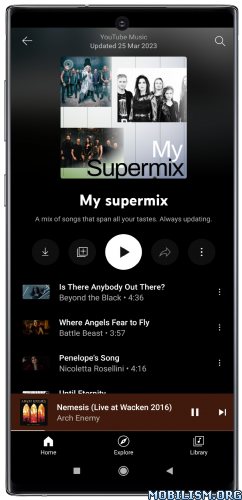
Overview: YouTube Music Morphe is a patched version of YouTube Music app with adfree music, background play capability and more.
✨ Features:
⭐ A-B loop ➠ Adds an option to loop part of a song by long-pressing the seekbar to set the loop start and end.
⭐ Android Auto ➠ Bypasses certificate checks and restores YouTube Music Home recommendations, Library collections, and podcasts in Android Auto.
⭐ App refresh rate ➠ Adds an option to change the app refresh rate.
⭐ Change header ➠ Adds an option to change the header logo in the top left corner of the app.
⭐ Change miniplayer color ➠ Adds an option to change the miniplayer background color to match the fullscreen player.
⭐ Change start page ➠ Adds an option to set which page the app opens in instead of the homepage.
⭐ Check watch history domain name resolution ➠ Checks if the device DNS server is preventing user watch history from being saved.
⭐ Crossfade ➠ Adds a true dual-player crossfade between consecutive tracks.
⭐ Custom branding ➠ Adds options to change the app icon and app name.
⭐ Custom font ➠ Adds an option to show the app with the device system font or a custom TTF or OTF font file instead of YouTube Sans.
⭐ Disable DRC audio ➠ Adds an option to disable DRC (Dynamic Range Compression) audio.
⭐ Disable QUIC protocol ➠ Adds an option to disable QUIC (Quick UDP Internet Connections) network protocol.
⭐ Disable audio ducking ➠ Adds an option to keep the volume unchanged when another app plays a short sound, such as a notification.
⭐ Disable auto captions ➠ Adds an option to disable captions from being automatically enabled.
⭐ Disable dislike redirection ➠ Adds an option to prevent skipping to the next track when the dislike button is pressed.
⭐ Downloads ➠ Adds support to download songs using the in-app download button, either with an external downloader app or inside YouTube Music.
⭐ Enable audio/video switch ➠ Adds an option to switch between the audio and the video version of a track by redirecting videoId.
⭐ Enable debugging ➠ Adds options for debugging and exporting Morphe logs to the clipboard.
⭐ Enable exclusive audio playback ➠ Enables the option to play audio without video.
⭐ Enable forced miniplayer ➠ Adds an option to enable forced miniplayer when switching between music videos, podcasts, or songs.
⭐ Enable swipe to dismiss miniplayer ➠ Adds an option to enable dismissing the miniplayer by swiping down on it.
⭐ Force original audio ➠ Adds an option to always use the original audio track.
⭐ Force portrait orientation ➠ Adds an option to keep the app in portrait orientation when the device is rotated.
⭐ GmsCore support ➠ Allows the app to work without root by using a different package name when patched using a GmsCore instead of Google Play Services.
⭐ Hide ads ➠ Adds options to hide fullscreen ads, Premium promotions and video ads.
⭐ Hide buttons ➠ Adds options to hide the cast, history, notification, search, voice search, sound search, and Library New buttons.
⭐ Hide flyout menu components ➠ Adds options to hide individual items from the player and queue flyout menus.
⭐ Hide layout components ➠ Adds options to hide general layout components.
⭐ Hide music action buttons ➠ Adds options to hide action buttons under the player.
⭐ Jam queue sharing ➠ Shares the host queue and playback controls through an authenticated Jam bridge. Root installation is not supported.
⭐ Media notification controls ➠ Adds options to disable the seekbar and previous/next buttons in the media notification and headphone controls.
⭐ Miniplayer previous and next buttons ➠ Adds options to show previous and next track buttons in the miniplayer.
⭐ Navigation bar ➠ Adds options to hide navigation bar, labels and buttons, and to show the navigation bar and miniplayer as glass.
⭐ Network proxy ➠ Adds settings to route supported network requests through an HTTP or HTTPS proxy. Including this patch may cause connectivity problems on certain devices
⭐ Open system share sheet ➠ Adds an option to always open the system share sheet instead of the in-app share sheet.
⭐ Pause when muted ➠ Adds an option to pause playback when the system volume is muted, and to resume it when the volume is raised.
⭐ Play albums songs ➠ Adds an option to play the song version of album tracks instead of music videos.
⭐ Playback speed ➠ Adds options to change the playback speed and pitch of tracks.
⭐ Playlist tags ➠ Adds an option to tag playlists from their menu, and to filter the Library playlists by tag.
⭐ Playlist track tap action ➠ Adds an option to play only the tapped track of a playlist or album, or to add it to the queue, instead of replacing the queue with the whole playlist.
⭐ PoToken provider ➠ Adds option to get PoToken using an external PoToken minter app.
⭐ Remember repeat state ➠ Adds an option to remember the repeat state when playing a new track or playlist.
⭐ Remember shuffle state ➠ Adds an option to remember the shuffle state when playing a new track or playlist.
⭐ Remember video quality ➠ Adds options to set default video qualities and remember the last selected video quality.
⭐ Remove background playback restrictions ➠ Removes restrictions on background playback, including playing kids videos in the background.
⭐ Remove viewer discretion dialog ➠ Adds an option to remove the dialog that appears when opening a video that has been age-restricted by accepting it automatically. This does not bypass the age restriction.
⭐ Return YouTube Dislike ➠ Adds an option to show the dislike count of tracks with Return YouTube Dislike.
⭐ Sanitize sharing links ➠ Removes the tracking query parameters from shared links.
⭐ Scrobbling ➠ Adds options to add played tracks to Last.fm and ListenBrainz.
⭐ Settings menu filter ➠ Adds an option to hide items on the standard YouTube Music settings screen by their visible name.
⭐ Skip silence ➠ Adds an option to automatically skip silent pauses in audio playback.
⭐ SoundProof ➠ Adds an option to skip tracks of artists reported as AI in the SoundProof community database.
⭐ SponsorBlock ➠ Adds options to enable and configure SponsorBlock, which can skip non-music segments.
⭐ Spoof app version ➠ Adds an option to trick the app into thinking you are running an older version.
⭐ Spoof video streams ➠ Adds options to spoof the client video streams to fix playback.
⭐ Theme ➠ Adds options for theming, and settings to change the app foreground and background colors.
⭐ Third-party lyrics ➠ Adds an option to show synced lyrics with experience enhancement from 19+ providers in the lyrics panel.
★★★ YouTube Music Morphe compiled by derrin ★★★
✨ New Features
YouTube & YouTube Music – Settings: Add “Mark all settings as seen” setting to remove all new setting dots (890f20f)
YouTube Music – Downloads: Native offline downloads support (#4698) (9ddd181)
YouTube Music – Enable audio/video switch: Add “Always play the song version” setting (#4595) (69ac226)
YouTube Music – Hide layout components: Add “Hide ‘You may also like’ section” setting (#4688) (a5d9266)
YouTube Music – Hide layout components: Add “Hide ‘Your downloads’ shelf” setting (d99ae84)
YouTube Music – Media notification controls: Add “Replace shuffle with loop button” setting (#4617) (913ec0f)
YouTube Music – Miniplayer : Add glass miniplayer, independent glass controls, spinning vinyl artwork, and dedicated miniplayer settings screen (#4621) (71caa5c)
YouTube Music – SponsorBlock: Retain SponsorBlock segments for offline music/video playback (#4768) (6c2191f)
YouTube Music – Third-party lyrics: Add spring scroll physics, instrumental gap indicators, retimed sync, and jump to current button (#4566) (f202bf3)
YouTube Music: Add A-B loop patch (#4685) (c3a57a6)
YouTube Music: Add Disable audio ducking patch (#4618) (963fa87)
YouTube Music: Add Disable auto captions patch (#4773) (8498d07)
YouTube Music: Add Open system share sheet patch (#4755) (2b399e2)
YouTube Music: Add Pause when muted patch (#4778) (30b93ec)
YouTube Music: Add Remember video quality patch (#4757) (011bd3e)
– Bug Fixes
GmsCore support: Restore device files search (#4725) (2416206)
Spoof video streams: “isOfflinePlayerResponse failure” error is shown with feed video inline playback (19b97df)
Spoof video streams: Fetch visionOS streams again with another visitor id when the visitor id is in the “pcm2” server A/B test, which can stop playback after about a minute (0306f45)
Spoof video streams: Quality selected in the quality menu is used for the next videos instead of the automatic quality (#4711) (f5afc79)
Spoof video streams: Show startup dialog if system WebView app is disabled or outdated (#4733) (c21df57)
YouTube Music – Crossfade: Equalizer apps detach from the outgoing track during the fade (#4622) (0618b8d)
YouTube Music – Crossfade: Volume normalization is lost after a crossfade (#4629) (c359b45)
YouTube Music – Downloads: Some playlists cannot be downloaded in-app (#4665) (8e02565)
YouTube Music – Enable audio/video switch: Toggle opens a Mix or switches to the wrong song (#4594) (e42c32d)
YouTube Music – Jam queue sharing: App crashes on 9.46 when opening the queue (598d044)
YouTube Music – Miniplayer: Artwork overflows when opening comments/lyrics sheets, fix RTL layout issues (#4742) (68e4e99)
YouTube Music – Navigation bar: Keep the Play button of Liked music above the glass navigation bar (#4857) (8c40810)
YouTube Music – Play albums songs: Ignore the ‘Don’t play music’ videos’ setting only while an album is playing (#4841) (b1241c0)
YouTube Music – Theme: Offline dialog not following theme (e6f600e)
YouTube Music – Third-party lyrics: Downloads patch breaks YouTube Music lyrics (#4673) (abf0dd2)
YouTube Music – Third-party lyrics: Restore lyrics tab for device files (#4722) (0f2c695)
YouTube Music – Third-party lyrics: Various minor bugs fix (#4709) (ec35e9a)
– Updated App Support
YouTube Music: Add experimental support for 9.46.51 (57b14fc)
➠ It’s based on the latest Morphe mpp features, bug fixes and optimizations for YouTube Music app (with Return YouTube Dislike, SponsorBlock and Morphe settings).
➠ Applied patches: