YouTube Music Morphe v9.15.51 [Stable Support] [mpp v1.41.0-dev.9]


YouTube Music Morphe v9.15.51 [Stable Support] [mpp v1.41.0-dev.9]

SHARE THIS POST
XRedditTelegramWhatsApp

YouTube Music Morphe v9.15.51 [Stable Support] [mpp v1.41.0-dev.9]
Requirements: 8.0+
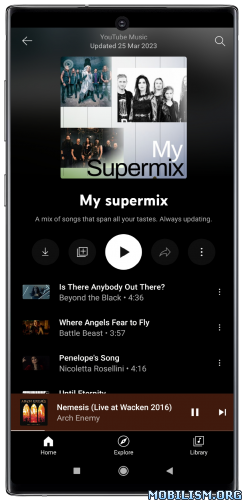
Overview: YouTube Music Morphe is a patched version of YouTube Music app with adfree music, background play capability and more.
Image

✨ Features:
⭐ App refresh rate ➠ Adds an option to change the app refresh rate.
⭐ Bypass certificate checks ➠ Bypasses certificate checks which prevent YouTube Music from working on Android Auto.
⭐ Change header ➠ Adds an option to change the header logo in the top left corner of the app.
⭐ Change miniplayer color ➠ Adds an option to change the miniplayer background color to match the fullscreen player.
⭐ Change start page ➠ Adds an option to set which page the app opens in instead of the homepage.
⭐ Check watch history domain name resolution ➠ Checks if the device DNS server is preventing user watch history from being saved.
⭐ Crossfade ➠ Adds a true dual-player crossfade between consecutive tracks. Requires YouTube Music 9.00 or newer; on older versions the patch is a no-op.
⭐ Custom branding ➠ Adds options to change the app icon and app name.
⭐ Disable DRC audio ➠ Adds an option to disable DRC (Dynamic Range Compression) audio.
⭐ Disable QUIC protocol ➠ Adds an option to disable QUIC (Quick UDP Internet Connections) network protocol.
⭐ Disable dislike redirection ➠ Adds an option to prevent skipping to the next track when the dislike button is pressed.
⭐ Downloads ➠ Adds support to download songs with an external downloader app using the in-app download button.
⭐ Enable debugging ➠ Adds options for debugging and exporting Morphe logs to the clipboard.
⭐ Enable exclusive audio playback ➠ Enables the option to play audio without video.
⭐ Enable forced miniplayer ➠ Adds an option to enable forced miniplayer when switching between music videos, podcasts, or songs.
⭐ Enable swipe to dismiss miniplayer ➠ Adds an option to enable dismissing the miniplayer by swiping down on it.
⭐ Force original audio ➠ Adds an option to always use the original audio track.
⭐ GmsCore support ➠ Allows the app to work without root by using a different package name when patched using a GmsCore instead of Google Play Services.
⭐ Hide ads ➠ Adds options to hide fullscreen ads, Premium promotions and video ads.
⭐ Hide buttons ➠ Adds options to hide the cast, history, notification, and search buttons.
⭐ Hide filter bar ➠ Adds an option to hide the filter bar at the top of the homepage.
⭐ Hide flyout menu components ➠ Adds options to hide individual items from the player and queue flyout menus.
⭐ Hide layout components ➠ Adds options to hide general layout components.
⭐ Hide music action buttons ➠ Adds options to hide action buttons under the player.
⭐ Miniplayer previous and next buttons ➠ Adds options to show previous and next track buttons in the miniplayer.
⭐ Navigation bar ➠ Adds options to hide navigation bar, labels and buttons.
⭐ Network proxy ➠ Adds settings to route supported network requests through an HTTP or HTTPS proxy.
⭐ Play albums songs ➠ Adds an option to play the song version of album tracks instead of music videos.
⭐ PoToken provider ➠ Adds option to get PoToken using an external PoToken minter app.
⭐ Remember repeat state ➠ Adds an option to remember the repeat state when playing a new track or playlist.
⭐ Remember shuffle state ➠ Adds an option to remember the shuffle state when playing a new track or playlist.
⭐ Remove background playback restrictions ➠ Removes restrictions on background playback, including playing kids videos in the background.
⭐ Remove viewer discretion dialog ➠ Adds an option to remove the dialog that appears when opening a video that has been age-restricted by accepting it automatically. This does not bypass the age restriction.
⭐ Return YouTube Dislike ➠ Adds an option to show the dislike count of tracks with Return YouTube Dislike.
⭐ Sanitize sharing links ➠ Removes the tracking query parameters from shared links.
⭐ Scrobbling ➠ Adds options to add played tracks to Last.fm and ListenBrainz.
⭐ Settings menu filter ➠ Adds an option to hide items on the standard YouTube Music settings screen by their visible name.
⭐ SponsorBlock ➠ Adds options to enable and configure SponsorBlock, which can skip non-music segments.
⭐ Spoof app version ➠ Adds an option to trick the app into thinking you are running an older version.
⭐ Spoof video streams ➠ Adds options to spoof the client video streams to fix playback
⭐ Third-party lyrics ➠ Adds an option to show synced lyrics from LRCLIB or KuGou in the lyrics panel.

★★★ YouTube Music Morphe compiled by derrin ★★★

➤ Morphe Patches mpp v1.41.0-dev.9

<span onClick=”if (this.parentNode.parentNode.getElementsByTagName(‘div’)[1].getElementsByTagName(‘div’)[0].style.display != ”) { this.parentNode.parentNode.getElementsByTagName(‘div’)[1].getElementsByTagName(‘div’)[0].style.display = ”; this.innerHTML = ‘Expand: hide‘; } else { this.parentNode.parentNode.getElementsByTagName(‘div’)[1].getElementsByTagName(‘div’)[0].style.display = ‘none’; this.innerHTML = ‘Expand: show‘; }” />Expand: show

[YouTube Music]
– Bug Fixes
● Translations: Report the HTTP status of a failed translation instead of a file not found error (b524f57)
● YouTube Music – Play albums songs: Restore music videos outside of albums and use the SponsorBlock segments of the song (55cd280)
● YouTube Music – Play albums songs: Use the length of the song instead of the length of the music video (e38ec78)
● YouTube Music – Scrobbling: Scrobble the song version of album tracks instead of the music video (9ceace2)
● YouTube Music – Third-party lyrics: Show the lyrics of the song version of album tracks (e29d3e9)
● YouTube Music: Various issues of the Play albums songs patch (#2698) (b18ca17)

v1.41.0-dev.8
✨ New Features
● Add App refresh rate patch (#2695) (e11c5e9)
● Settings: Add an option to change the name of the Morphe settings entry (#2691) (942d6fb)

v1.41.0-dev.7
✨ New Features
● YouTube Music – Hide music action buttons: Add “Hide ‘Live chat replay’ button” setting (#2674) (d43da80)
● YouTube Music: Add Play song version in albums patch (#2556) (5093f61)

v1.41.0-dev.6
– Bug Fixes
● Enable debugging – Feature flags manager: Only use active flags as binary search candidates (c6f0e1d)

✨ New Features
● Enable debugging – Feature flags manager: Redesign and add flag forcing, import and export, and binary search (#2638) (f0fdebe)
● Enable debugging – Feature flags manager: Tell apart a behavior with no flag from one caused by more than one flag (249c6bf)

v1.41.0-dev.3
– Bug Fixes
● YouTube Music – Theme: Fade the page header into the background color (#2636) (5f5a478)

✨ New Features
● Add PoToken provider patch (#2618) (fb25ff1)

v1.41.0-dev.2
– Bug Fixes
● Theme: Prevent an endless activity relaunch loop (212fc09)

– Updated App Support
● YouTube Music: Add experimental support for 9.34.52 (fea25c2)

v1.41.0-dev.1
– Bug Fixes
● Settings: Resolve OOM crashes and prevent duplicate dialogs (047121d)
● Theme: “App default” color is drawn pure black instead of the colors of the app (07c6d35)
● Theme: Add new color tokens and Litho hooks (a7d7520)
● Theme: Morphe dialogs and settings are pure black with the “App default” color (f5ce706)
● Theme: Splash screen is pure black with the “App default” color (4a226c7)
● Theme: Use more compact custom theme palette (73eab93)

➠ It’s based on the latest Morphe mpp features, bug fixes and optimizations for YouTube Music app (with Return YouTube Dislike, SponsorBlock and Morphe settings).

➠ Applied patches:

<span onClick=”if (this.parentNode.parentNode.getElementsByTagName(‘div’)[1].getElementsByTagName(‘div’)[0].style.display != ”) { this.parentNode.parentNode.getElementsByTagName(‘div’)[1].getElementsByTagName(‘div’)[0].style.display = ”; this.innerHTML = ‘Expand: hide‘; } else { this.parentNode.parentNode.getElementsByTagName(‘div’)[1].getElementsByTagName(‘div’)[0].style.display = ‘none’; this.innerHTML = ‘Expand: show‘; }” />Expand: show

✅ App refresh rate
✅ Bypass certificate checks
✅ Change header
✅ Change miniplayer color
✅ Change start page
✅ Check watch history domain name resolution
✅ Crossfade
✅ Custom branding
✅ Disable DRC audio
✅ Disable QUIC protocol
✅ Disable dislike redirection
✅ Downloads
✅ Enable debugging
✅ Enable exclusive audio playback
✅ Enable forced miniplayer
✅ Enable swipe to dismiss miniplayer
✅ Force original audio
✅ GmsCore support
✅ Hide ads
✅ Hide buttons
✅ Hide filter bar
✅ Hide flyout menu components
✅ Hide layout components
✅ Hide music action buttons
✅ Miniplayer previous and next buttons
✅ Navigation bar
✅ Network proxy
✅ Play albums songs
✅ PoToken provider
✅ Remember repeat state
✅ Remember shuffle state
✅ Remove background playback restrictions
✅ Remove viewer discretion dialog
✅ Return YouTube Dislike
✅ Sanitize sharing links
✅ Scrobbling
✅ Settings menu filter
✅ SponsorBlock
✅ Spoof app version
✅ Spoof video streams
✅ Theme
✅ Third-party lyrics
✅ Disable Play Store updates
✅ Clone app

★ Changed version code
➡ Package name: app.morphe.android.apps.youtube.music
➡ Languages: Full Multi Languages
➡ CPU architectures: arm64-v8a, armeabi-v7a
➡ Screen DPIs: 120dpi, 160dpi, 240dpi, 320dpi, 480dpi, 640dpi

➠ Non-Root variant, MicroG Services (GMSCore) from links below is required

➠ How to Install:
• Install MicroG Services (GMSCore)
• Then install YouTube Music Morphe
• Open YouTube Music Morphe
• Log in to your Google account

➠ credit Morphe

➠ Notes :
⚠️ To prevent playback issues go to Settings ➤ Morphe ➤ Miscellaneous and Switch on / enable “Spoof video streams”; press on “Default client” if you want to select from the list a different default client for spoofing.

⚠️ To prevent playback issues with PotHelper (It may stop working at any time):
Install PotHelper
Turn off: Morphe > Miscellaneous > Spoof video streams > Spoof video streams
Turn on: Morphe > Miscellaneous > PoToken provider > External PoToken provider
Restart the app and check for playback issues

➡ To change “App name” ( YT Music / YT Music Morphe / Music Morphe / Music ) and “App Icon” (Original / Morphe variants) go to Settings ➤ Morphe ➤ General
➡ To change “Header logo” (Default / Morphe) go to Settings ➤ Morphe ➤ General
➡ To change “Dark theme” (App default / Pure Black / Material You variants (Android 12+) / Classic YouTube / Catpuccin (Mocha) / Dark variants / Custom) go to “Settings” ➤ Morphe ➤ General ➤ “Dark theme background”

Latest morphe patches for YouTube Music app are v1.41.0-dev.9

What’s New:
– Base updated to YouTube Music v9.15.51
– Latest updated Morphe mpp features, bug fixes and optimizations

This app has no advertisements

More Info:
https://play.google.com/store/apps/details?id=com.google.android.apps.youtube.music&hl=en

Download Instructions:
armeabi-v7a:
https://ouo.io/gyPXyr

Mirrors:
https://ouo.io/4TDH4u … d.apk.html
https://ouo.io/1w6MKb

arm64-v8a:
https://ouo.io/6gnOvs

Mirrors:
https://ouo.io/X3hLea … d.apk.html
https://ouo.io/YlxWri

ReVanced MicroG Services (GMSCore) v0.3.13.2.250932 build 250932004 [Official]:
https://ouo.io/aYlHv0

Mirrors:
https://ouo.io/5uXnD2 … d.apk.html
https://ouo.io/S2I3M8

For Huawei devices:
https://ouo.io/9a8J4q

Mirrors:
https://ouo.io/2WHfTo … d.apk.html
https://ouo.io/g2LWXK

MicroG RE (GmsCore Redesign) v6.1.4 255034004 [by WSTxda]:
https://ouo.io/0t4vKK

Mirrors:
https://ouo.io/dv21WQ
https://ouo.io/r4ORv7

PotHelper v1.1.1:
https://ouo.io/5jWgCsG

Mirrors:
https://ouo.io/oO24pFN
https://ouo.io/W35Utf

SHARE THIS POST
XRedditTelegramWhatsApp
Tags Android, apk, Apps