Niagara Launcher ‧ Home Screen v1.16.32 [Pro]
Requirements: 8.0+
Overview: A minimalist productivity launcher. One hand-friendly. Zero ads.
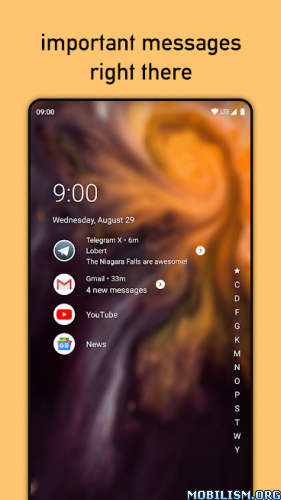
Niagara Launcher gives your phone a whole new look and offers a minimalistic experience to help you to form a healthy relationship with your phone. You also get to experience the latest and greatest features of Android 10, including smart replies and dark mode.
Top reasons to use Niagara Launcher:
All apps in a simplified list · You just need to scroll either of the edges on the launcher to get access to all of your apps instantly.
Interact with notifications right on the home screen · Unlike most other launchers, Niagara Launcher gives you essential information about received messages at a glance and directly on your home screen. Swiping on a notification expands it and lets you reply quickly.
Ergonomic efficiency · Niagara Launcher is optimized for one hand usage. Your apps are always within reach and the scrollbar can be used from both sides.
Lightweight & fast · Niagara Launcher is not only lightweight to your phone’s resources, but at just a few megabytes in size, the app takes up very little space. Next to simplicity, fluidity is one of the most important aspects of Niagara Launcher.
Media Player · Music controls automatically show up on your home screen when they’re needed, too – anytime you’re playing audio from an app.
Theming · Niagara Launcher pulls colors from your wallpaper for a nice thematic effect. Additionally, you can choose between a light or dark theme. Icon packs are supported as well – you can even apply an icon of your choice to each app individually.
Hide unwanted Apps · Hide all pre-installed bloatware, to get a clean and tidy home screen.
❏ Mod info:
◉ Pro Unlocked
◉ Use any other Weather Widget app, Its own weather widget won’t work
★ Modded By RBMods
What’s New:
Allow Setting a Separate Lockscreen Wallpaper
This resolves a major issue that many of you reported:
With the Studio Update, we introduced our own wallpaper picker in Niagara Launcher, which allows you to crop your wallpaper before applying it to your homescreen.
On some Android devices (e.g., on Google Pixel phones when setting a wallpaper from Google Photos), the wallpaper picker provided by the default launcher is always preferred for setting wallpapers. Since our wallpaper picker only supported the homescreen, this essentially prevented you from setting a separate lockscreen wallpaper with Niagara Launcher as your default launcher.
With this update, our wallpaper picker offers the option to only apply a wallpaper to the lockscreen, so this issue should now be a thing of the past.
Do Not Show Calculator in Search if There’s Nothing to Calculate
Previously, the calculator would hijack the first search result when searching for apps such as “99” (a taxi app in Brazil). Besides being annoying, this prevented you from opening the app quickly by pressing Enter on your keyboard. This update fixes the issue by only displaying the calculator if there’s actually something to calculate.
Thanks to everyone who reported this!
Update Translations
As you might be accustomed to by now, this update contains the latest translations brought to you by our translation community on Crowdin. Thanks to everyone who contributed this past week!
If there’s a piece of text you’d like to see translated or think that it could be phrased differently, we’d love to welcome you to our translation community.
This app has credit advertisements
More Info:https://play.google.com/store/apps/details?id=bitpit.launcher
Download Instructions:
https://ouo.io/ad2a1DA
Mirror:
https://ouo.io/crvkxd … s.apk.html
![Clipboard+: Clipboard Manager v10.13.12 [Pro]](https://images.mobilism.org/?dm=OHU042YM "Clipboard+: Clipboard Manager v10.13.12 [Pro]")
![Soup Recipes v31.0.5 [Premium]](https://apkmagic.com.ar/wp-content/uploads/2023/02/08/Soup-Recipes-v3105-Premium.webp "Soup Recipes v31.0.5 [Premium]")
![Learn Python Coding – Mimo v9.33 b1791536327 [Premium] [Fixed]](https://images.mobilism.org/?dm=VYXEE7AQ "Learn Python Coding – Mimo v9.33 b1791536327 [Premium] [Fixed]")
