MT Manager v2.26.9-clone [Premium]
Requirements: 5.0 and up
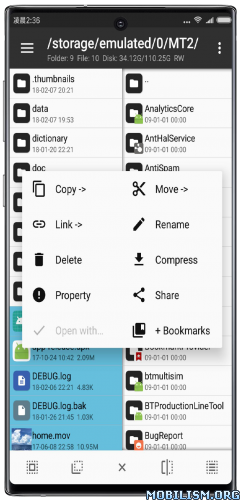
Overview: MT Manager is a very powerful file manager and apk editor, you can use it to do a lot of things on your device, such as managing files, modifying and translating applications, editing text and so on.
Features:
– FTP client
– Viewing the java code
– Support for keystore and jks signatures [VIP]
– Search History
– Search in XML files
– Search by ID in arsc
– Support for several dictionaries in the translator (UTF-8 without BOM) [VIP]
– Removing and adding localizations
– Fast transfer of unique strings to the desired localization
– Batch operations (delete, copy, move, rename)
– APK/ZIP Signing
– Cloning of APKs
– Optimizing APK
– APK Encryption
– Creating a backup (.bak)
– Convenient color change in arsc
– Current Activities List
– Remote access via WiFi
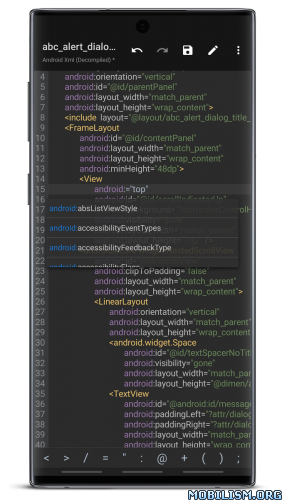
– Decompilation / Compiling XML [VIP] (non-vip is limited to only 200-lines)
– Arsc Editor
– DEX Editor
– Fix DEX files [VIP]
– Text editor with syntax highlighting
– Comparison of text files up to 500 KB [VIP]
– View fonts (.ttf)
– Executing scripts
– Working with RAR (opening / unpacking)
– Work with ZIP (compression / unpacking)
– Multi-choice
– View / edit / delete / add classes, methods, domains, permanent
– Baidu Translator, Yandex and Google [VIP]
What’s New:
– [New] Plugin Center now supports publishing and downloading v3 version plugins.
– [New] bottom bookmark bar now includes search and “move to top” functions and bookmarks are now added as first item by default.
– [New] Added frequently used password entry to main interface sidebar tools group.
– [New] Supports selecting which sub-packages to install when installing APKs/XAPKs.
– [New] Terminal emulator supports setting custom fonts.
– [New] Dex+ to Java conversion feature now supports selecting inner classes for decompilation as well
– [New] Support for decompressing 7z files compressed using zstd method
– [New] Added filename swapping functionality to file menu tool, supporting local files and network storage
– [New] video player now supports audio track and subtitle switching (external subtitles must be placed in same directory).
– [New] video player now supports adaptive landscape and portrait modes (automatically switches between landscape and portrait modes based on video’s aspect ratio).
– [Optimized] To unify global operation logic, right-swipe menu in sidebar list of main interface, text editor and project interface has been removed and replaced with a long-press menu.
– [Optimized] Improved compatibility with TGA image files
– [Optimized] Reordered floating buttons in lower right corner of installation package extraction interface
– [Optimized] Improved error descriptions to avoid misunderstandings regarding issue of files visible but inaccessible in Android/data
– [Optimized] When opening a compressed file, if a commonly used password is automatically entered, a prompt will appear (specific password can be viewed in management interface).
– [Optimized] WebDAV support for 307/308 redirect requests to servers.
– [Fixed] issue where SMB and SFTP could not log in to some servers
– [Fixed] issue where search highlighting might appear after clearing search content in text editor
– [Fixed] issue where Dex comparison function incorrectly treated some Dex files as ZIP files
– [Fixed] issue where long-press menu in Dex++ navigation dialog might not work after setting hidden items
– [Fixed] issue where folder names displayed in Object Storage S3 might be missing a character at end
– [Fixed] issue where modifying file owner and user group would result in an error if UID exceeded 65535.
– [Fixed] issue where file data would be corrupted when using extreme compression and password protection simultaneously when creating a ZIP file.
[ Current version features ]
• No login required
• Arsc editor plus
• Resource anti-confuse
• Dex string decryption
• Dex anti-confusion
• Dex comparison
• Text comparison
• XML decompilation
• No limit in hex editor
• Smali to Java (Jadx/Jadx Simple/Jadx Fallback/FernFlower/VineFlower/JD-Core/Procyon/CFR)
• Signature killer
• Document provider
• Key generator (JKS/BKS)
• APK coexistence (official old scheme)
• Add network storage (FTP/FTPS/SFTP/SMB/WebDav/Object Storage)
This app has no advertisements
More Info:https://mt2.cn
https://t.me/mtmanager
Download Instructions:
https://ouo.io/HJNS0o
Mirrors:
https://ouo.io/g5nghEm
![Desh Hindi Keyboard v17.6.3 [Premium]](https://images.mobilism.org/?dm=OWSN "Desh Hindi Keyboard v17.6.3 [Premium]")
![Plant Parent – My Care Guide v1.29 [Premium]](https://apkmagic.com.ar/wp-content/uploads/2023/02/09/Plant-Parent-My-Care-Guide-v1271-Premium.webp "Plant Parent – My Care Guide v1.29 [Premium]")
![Blaux Black – Icon Pack v1.7.5 [Patched]](https://images.mobilism.org/?dm=0F7XFI3H "Blaux Black – Icon Pack v1.7.5 [Patched]")
