MT Manager v2.26.11 build 26110365 [Official] + [Clone]
Requirements: 5.0+
Overview: MT Manager is a very powerful file manager and apk editor, you can use it to do a lot of things on your device, such as managing files, modifying and translating applications, editing text and so on.
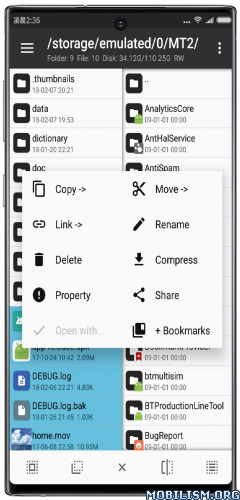
Features:
– FTP client
– Viewing the java code
– Support for keystore and jks signatures [VIP]
– Search History
– Search in XML files
– Search by ID in arsc
– Support for several dictionaries in the translator (UTF-8 without BOM) [VIP]
– Removing and adding localizations
– Fast transfer of unique strings to the desired localization
– Batch operations (delete, copy, move, rename)
– APK/ZIP Signing
– Cloning of APKs [VIP, free for the old method]
– Optimizing APK
– APK Encryption
– Creating a backup (.bak)
– Convenient color change in arsc
– Current Activities List
– Remote access via WiFi
– Decompilation / Compiling XML [VIP] (non-vip is limited to only 200-lines)
– Arsc Editor
– DEX Editor
– Fix DEX files [VIP]
– Text editor with syntax highlighting
– Comparison of text files up to 500 KB [VIP]
– View fonts (.ttf)
– Executing scripts
– Working with RAR (opening / unpacking)
– Work with ZIP (compression / unpacking)
– Multi-choice
– View / edit / delete / add classes, methods, domains, permanent
– Baidu Translator, Yandex and Google [VIP]
★ Untouched apk with Original Hash Signature
★ No changes were applied
➡ Languages: Full Multi Languages
➡ CPU architectures: arm64-v8a, armeabi-v7a, x86, x86_64
➡ Screen DPIs: 120dpi, 160dpi, 240dpi, 320dpi, 480dpi, 640dpi
Note: The clone can be installed alongside the regular/normal version {Package Name: bin.mt.plus.canary}, useful in case you have multi-login activated, or need two separate instances of the app.
Version – TargetSdk28
Due to policy requirements of app store, MT’s targetSdk has been upgraded to 30.
This change will have several impacts:
– Execution permission has been removed from application data directory. This change mainly affects terminal emulator: previously you could put executable file in home directory and then chmod +x to execute it, but now you cannot do this.
– For ROOT devices, if -su command does not support setting mount namespace, then only two folders can be seen after accessing the /data/data directory. This situation is currently known to exist in Meizu’s own ROOT.
– If these changes affect your use, you can download TargetSdk28 version, and above problems will not exist.
– This version can only be downloaded from official website and will not be put on app store. Subsequent updates can be updated from within app or downloaded from official website. Do not update from app store!
What’s New:
Version: 2.26.11 ✅ (26110365)
【New】Interface analysis function (activity log + interface structure inspection).
【New】HEX Compare: Compare and edit files simultaneously (hold two selected files → HEX Compare).
【New】MCP Service: Added real-time event log, tool for getting list of installed applications and tool for deleting records from ARSC resource tables.
【New】MCP Service: Added a file transfer tool (e.g., PC AI can upload and download files to and from a mobile device; the AI needs to support HTTP file transfer).
【New】HTML and Markdown: Added file opening settings – “Ask each time”, “Edit directly” or “Open in preview mode” (these settings can also be changed in the preview interface).
【New】HTML and Markdown Viewer: Greatly expanded capabilities, including searching, file selection, and root directory switching.
【New】User Information Dialog: Clicking on the account row now allows you to hide or show the MT account ID and email address.
【New】Added support for opening multi-volume TAR archives (e.g. .tar.partaa).
【New】Added display of audio file thumbnails (supported for both local and network storage).
【New】Added the ability to quickly rename individual APK files with support for custom name templates.
【New】Image Viewer: Added the ability to view image information and EXIF metadata.
【Optimization】MCP Service: Various optimizations have been implemented to reduce token consumption during code analysis without loss of quality.
【Optimization】Open with dialog: Now allows you to switch between categories by swiping horizontally or tapping the tabs at the top of the screen.
【Optimization】Code formatting and minification are now performed in Strict Mode by default: syntax errors are detected and their locations are indicated. For non-critical, recoverable errors, you can select Permissive Mode to force processing.
【Optimization】Music player: Long-pressing on album art opens it in full-screen mode. A file save option has also been added to the menu.
【Updated】7-Zip library has been updated to the latest version 26.05.
【Fixed】Fixed the issue where resolution information was not displayed in the image viewer on some devices.
【Fixed】Fixed the issue where image fragments were shifted when enlarging some images.
【Fixed】Fixed a text editor bug that could cause locally stored files to be mistakenly identified as deleted.
【Fixed】Fixed several text editor issues that appeared in the previous version.
【Fixed】Fixed some icons being offset after converting AXml vector graphics to SVG.
【Fixed】Fixed an issue where the app might not work properly when changing the system dark theme in Small Window (Floating Window) mode.
【Fixed】Fixed the incorrect display of light and dark interface color schemes.
【Fixed】Fixed an issue with 9-patch images: after compilation, information about the outline with rounded corners was lost, causing the rounding and shadows of some UI elements to be displayed incorrectly.
This app has no advertisements
More Info:https://mt.cc
https://t.me/mtmanager
Download Instructions:
MT2:
https://ouo.io/Y7ScoP
Mirrors:
https://ouo.io/x5aWXKH
https://ouo.io/L1a03L
Clone:
https://ouo.io/PlPsyJ
Mirrors:
https://ouo.io/6VAYPQ
https://ouo.io/aP7EB1K
TargetSDKversion=28:
https://ouo.io/5cdxnNM
Mirrors:
https://ouo.io/kHjRk9
https://ouo.io/a8YQI5
Clone:
https://ouo.io/e1K5sB
Mirrors:
https://ouo.io/auRIoXq
https://ouo.io/Nvkwii


