hyperion launcher v2.0.30 build 99 [Pro]
Requirements: 6.0+
Overview: A launcher is not just a home, it needs to be an experience.
● Support Chat: t.me/HyperionHub
● Hyperion Dock (Enable Google Feed): prjkt.io/dock
We believe that not only should everyone deserve a sweet, feature-filled launcher with a beautiful UX, we wanted it to always be up to date with the best of what Google has to offer at a consistent pace, as well as consistently pushing new tweaks and customization options that users want…without the bloat!
We streamlined this launcher for ourselves; by bringing the best features we love from many launchers found on the market and creating a unified experience – we can truly call this home. As usual, we have everything that a typical Launcher3 based launcher has, but much more!
Features:
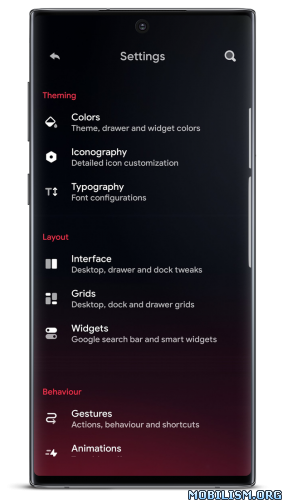
★ Colours:
• Launcher and accent theming: with an intricately designed theme by Manuel Möllmann (Deep Darkness Theme)
• Drawer background; glow adjustments and scrolling indicator colour
• Dock background colour
• Folder background colour
• Search widget colours (Drawer/Dock)
• Smart widget colours
★ Iconography:
• Desktop, Drawer and dock icon changes (Icon size, Label size, Text colour, Text shadows, Multiple lines)
• Adaptive icon shaping
★ Typography:
• Full launcher font change (Pro!)
★ Interface:
• Covers: For folders, you can swipe up to open or mask the folder with a main icon
• Icon packs: View your icon pack changes immediately without quitting activities!
• Hidden apps
• Overview menu items: Adjust what you want when long pressing the home screen
• App launch locking (Launcher level only, will not prevent launch from other places)
• Desktop locking (includes temporary unlocking)
• Scrolling wallpaper
• Status bar and navigation bar icon colouring (Wallpaper/Dark/Light)
• Wallpaper gradient adjustments
• Homescreen wallpaper dimming on dark mode
• Drawer and Dock blur
• Navigation bar display
• Google Feed (Hyperion Dock)
• Remembering app drawer position/Automatically close
• Dock/Page indicator styling
• Dock styling and shadow
• Two row dock
• Automatically hide Icon Pack/Substratum theme dashboards and other dashboards (Pro!)
★ Grids:
• Desktop, Drawer and Dock
★ Widgets:
• Google Search Widget
• Google Smart Widget (Pro!): Does not need a launcher plugin/bypass!
★ Custom Gestures (Pro!):
• One/Two finger double tap, swipe up, swipe down
★ Animations:
• Launcher animation speed
• App launch animation
• Fade on swipe transition
• Bounce physics
★ Profile manager:
• Visual, always shows you a screen of what your set up looks like!
Credits and acknowledgements:
We would like to give thanks to a ton of people who worked and contributed with our development team throughout the whole process!
● Manuel Möllmann
● Max Patchs
● Amir Zaidi
● PaphonB
● Till Kottmann/David Siedtmann (Lawnchair Team)
Permissions overview:
● Query all apps: To show apps installed on your device.
● Storage: We use storage only for wallpaper extraction for adaptive colors and backing up and restoring profiles.
● Calendar: To show events on your desktop.
● Location: For an automatic weather reading on your desktop.
● Accessibility: To lock the screen or show the recent apps screen triggered by custom tap or swipe gestures.
● Device Administrator: To lock the screen triggered by custom tap or swipe gestures.
❏ Mod Info:
◉ Pro Unlocked
◉ No active trackers
◉ Analytics disabled
◉ Cleared Manifest
◉ Debug code removed
➡ Architectures: arm64-v8a, armeabi-v7a, x86, x86_64
➡ Languages: ar, ar-SA, de, de-DE, en-AU, en-CA, en-GB, en-IN, en-XC, es, es-419, es-ES, es-US, et, et-EE, fi, fi-FI, fr, fr-CA, fr-FR, hi, hi-IN, hu, hu-HU, in, in-ID, it, it-IT, ja, ja-JP, ko, ko-KR, ms, ms-MY, nl, nl-NL, pt, pt-BR, pt-PT, ru, ru-RU, sv, sv-SE, th, tr, tr-TR, uk, uk-UA, vi, vi-VN, zh-CN, zh-HK, zh-TW
➡ Screen DPIs: 120dpi, 160dpi, 240dpi, 320dpi, 480dpi, 640dpi
► Credit: cenzo402
What’s New:
With all-new theming system, home transition animation
and tons of improvements.
This update is the biggest one we’ve ever made!
This app has no advertisements
More Info:https://play.google.com/store/apps/details?id=projekt.launcher
Download Instructions:
https://ouo.io/CuBPkdc
Mirrors:
https://ouo.io/xItfwAs

![n-Track Studio DAW: Make Music v10.5.67 build 1000510760 [Premium]](https://images.mobilism.org/?dm=QACMYUJB "n-Track Studio DAW: Make Music v10.5.67 build 1000510760 [Premium]")