Follow Us!

Battery manager and monitor v11.10.7 [Paid] [Bundle]
Requirements: 6.0+
Overview: The most beautiful and powerful battery manager for android! Include battery monitor and battery saver.
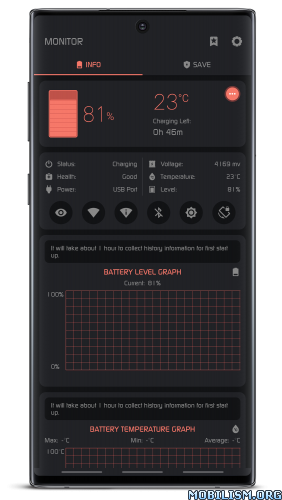
You are able to monitor battery information and save power at the same time. Battery manager provides many kinds of tools. including: one tap boost, ram widget, cpu widget, battery widget, desktop floating window, status bar floating window, over heat alarm. You can monitor the ram, cpu and battery information very convenient. The detail features including:
★ Battery Monitor
Show the curve of battery usage and temperature. Monitor the battery status, including: health, power status, voltage, level.
★ Battery Saver
Extends battery life and optimizing device settings. You can choose “LONG LIFE MODE” or “CUSTOM SAVE MODE”.
★ One Tap Boost
You can create the『One Tap Boost』shortcut, boost ram very convenient.
★ Temperature Over Heat Alarm
Battery manager will trigger an alarm when cpu’s or battery’s temperature is over heat, you can choose open or close the over heat alarm as your like.
★ Floating Window
Floating window show the cpu temperature, battery temperature, ram usage real time, including: status bar floating window and desktop floating window.
★ Widget
Support ram widget, cpu widget and battery widget.
★ Multi-Theme
Battery manager is very beautiful and support multi-theme switching, you can choose the theme you like.
If you buy battery manager, you will have battery monitor, battery saver at the same time!
What’s New:
1. Added and optimized floating window functions
2. Fixed the abnormal display position issue of floating window in landscape mode
3. Added custom settings for data refresh frequency
=====================
SAI Instructions: [no root]
1. Download and install latest SAI app (Split APK Installer) – https://github.com/Aefyr/SAI/releases
2. Download this .apks archive app;
3. Install and Open SAI / Choose “Install APKs“ button / Find and Select downloaded .apks archive app;
4. Wait for install and done. Enjoy!
Lucky Patcher Instructions: [no root]
1. Download and install latest Lucky Patcher app;
2. Install and Open Lucky Patcher and choose ‘Rebuild & Install’;
3. Find and Select downloaded this .apks archive app;
4. Wait for install and done. Enjoy!
PS: Make sure after open SAI or Lucky Patcher you allowed STORAGE Permission and Install Unknown Apps Permission!
======================
Package Info:
- Languages: Full Multi Languages;
- CPUs: universal architecture;
- Screen DPIs: 120dpi, 160dpi, 240dpi, 320dpi, 480dpi, 640dpi;
- Untouched [Paid] apk with Original Hash Signature, no [Mod] or changes was applied;
- Certificate MD5 digest: eb34876c9acebd5377564faf83a03477
This app has no advertisements
More Info:https://play.google.com/store/apps/details?id=com.glgjing.thor
Download Instructions:
https://ouo.io/YhznWC5
Mirrors:
https://ouo.io/QIpXXp
https://ouo.io/4ismps
https://ouo.io/eBpOW1
https://ouo.io/d9bV35
https://ouo.io/2lfq1J
https://ouo.io/c3XEbK
![SD Maid 2/SE – System Cleaner v1.4.2-beta1 [Github] [Pro]](https://images.mobilism.org/?dm=FCQ8PP6W "SD Maid 2/SE – System Cleaner v1.4.2-beta1 [Github] [Pro]")
![0Ground2 v5.8 [Patched]](https://images.mobilism.org/?dm=QFVAWI83 "0Ground2 v5.8 [Patched]")
![Beat.ly: music video maker v2.17.10567 [VIP]](https://apkmagic.com.ar/wp-content/uploads/2021/05/19/Beatly-–-Music-Video-Maker-with-Effects-v11810188-VIP.png "Beat.ly: music video maker v2.17.10567 [VIP]")
