App Manager v4.1.1 [Stable]
Requirements: 5.0+
Overview: A full-featured open source package manager for android. App Manager began by merging the features of App_packages Info (formerly Application Info), ClassyShark3xodus, Activity Launcher and Watt into a single app with material design and dark mode to give a modern look and feel.
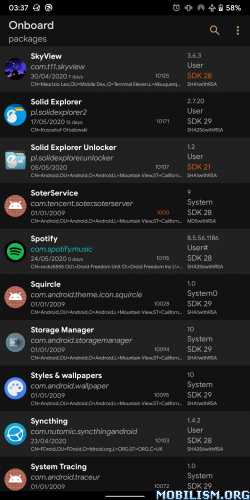
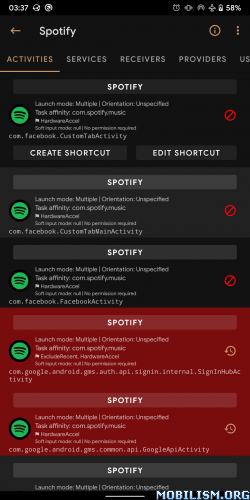
App Manager began by merging the features of App_packages Info (formerly Application Info), ClassyShark3xodus,
Activity Launcher and Watt into a single app with material design and dark mode to give a modern look and feel.
Features
General features
● Fully reproducible, copylefted libre software (GPLv3+)
● Material design (but not material colours!)
● No unnecessary permissions
● Does not connect to the Internet
● Displays as much info as possible in the main page
● Lists activities, broadcast receivers, services, providers, permissions, signatures, shared libraries, etc. of any app
● Launch (exportable) activities and services
● Create (customizable) shortcuts of activities
● Intercept activities
● Scan for trackers and libraries in apps and list (all or only) tracking classes (and their code dump)
● View the manifest of an app
● Display your app usage, data usage, and app storage info (requires “Usage Access” permission)
● Install/uninstall APK files (including APKS, APKM and XAPK with OBB files)
● Share APK files
● Back up/restore APK files
● Batch operations
● One-click operations
● Logcat viewer
● Profiles (including presets for quick debloating)
● View app usage along with mobile and wifi data usage
● Open app in Aurora Store or in your F-Droid client
● Sign APK files before installing them
● Backup encryption: OpenPGP via OpenKeychain, RSA (hybrid encryption with AES) and AES.
Root/ADB-only features
● Revoke permissions considered dangerous by Android
● Deny or ignore app ops
● Display/kill/force-stop running processes/apps
● Clear app data or app cache
Root-only features
● Block any activities, broadcast receivers, services, or providers of an app with native import/export as well as Watt and Blocker import support
● View/edit/delete shared preferences of any app
● Back up/restore apps with data, rules and extras (such as permissions, battery optimization, SSAID, etc.)
● System configuration, blacklisted or whitelisted apps
● View/change SSAID, net policy, battery optimization
…and many more! This single app combines the features of 5 or 6 apps any tech-savvy person needs!
★ Untouched apk with Original Hash Signature
★ No changes were applied
★ Certificate MD5 digest: f759632b4cf3a7a8b4f3014dc7349e42
➡ Languages: Full Multi Languages
➡ CPU architectures: arm64-v8a, armeabi-v7a, x86, x86_64
➡ Screen DPIs: 120dpi, 160dpi, 240dpi, 320dpi, 480dpi, 640dpi
What’s New:
App Manager v4.1.1 improves permissions, installation, ADB connectivity, and several other parts of the application. Visit Settings > About > Version/Changelog for details.
Revoke Internet Permission
App Manager can now block internet for individual applications utilizing the eBPF rules in root or ADB mode. To block internet for an application, go to the “Uses permissions” tab and click on the toggle button next to android.permission.INTERNET to revoke the permission.
Known Limitation. The eBPF rules are lost after a reboot. App Manager attempts to restore the rules right after a reboot. However, in ADB mode, it might take a while to connect to wireless debugging depending on the availability of a Wi-Fi connection. This might allow applications that start after a reboot to use internet.
Others
● Added support for editing .bat files
● Improved installation reliability and performance
● Improved permission management
● Improved ADB pairing, connections, and mode handling
● Improved settings transitions and startup messages
● Fixed displaying profiles after creating a profile for the first time
● Fixed intercepting browser URLs
● Fixed listing applications on Android 17
● Fixed title ordering in What’s New dialog.
This app has no advertisements
More Info:https://github.com/MuntashirAkon/AppManager
Download Instructions:
https://ouo.io/fnRCQS
Mirrors:
https://ouo.io/LHc3L6

![TickTick:To-do list & Tasks v6.5.3.0 [Premium]](https://play-lh.googleusercontent.com/gju7efa9sPtDA1hR9TX1s7k6p-Nu4DVUGdwzkuJmGL6sguSnlEv-PZWrYQpWdkjZJVM=w526-h296-rw "TickTick:To-do list & Tasks v6.5.3.0 [Premium]")

