AMdroid Alarm Clock v5.6.0 [Premium
Requirements: 6.0+
Overview: AMdroid Smart Alarm Clock is an innovative, feature-rich alarm clock application. It’s smart and fully customizable, and it can make your morning routine better; no more oversleeping!
• An alarm clock with unlimited, fully customizable alarm profiles
Recurring alarms – on top of the basic settings, you can use advanced recurrence, such as daily or weekly repeats, intervals, set expiration, etc. (ideal for shift workers working in cycles)
One-time alarms – set any date
Countdown alarms – perfect for an afternoon siesta or zizz
• Each alarm has its own settings
Wake up and start your morning routine with your favorite song along with real-time weather information
Use challenges (Math, Captcha, Wi-Fi, NFC) to prevent oversleeping – great for heavy sleepers
Adjust snooze time on the fly – for the snoozy ones
Restrict alarms to locations
Many more features to tweak your alarms, yet you can familiarize yourself with it in a timely manner
• Let you sleep on off-days
Ever been roused from a good, deep sleep on a public holiday, just because the alarm clock wasn’t turned off? AMdroid knows the public holidays for your country; alarms won’t go off on these days (optional).
• Android Wear integration
Snooze or dismiss alarms right from your wrist. Adjust next alarm or add new one-time alarms, using voice commands.
• No more oversleep with this alarm clock
Can’t wake up? Configure dismiss challenges to wake up timely. Use post alarm confirmation to make sure you are awake and avoid oversleeping. Perfect alarm clock for heavy sleepers.
• Wake up during light sleep
Awakening from a good, deep sleep can cause enervation. Configure a gentle pre-alarm that will go off before the main one. By utilizing sleep cycle calculation following your biorhythm it can be scheduled automatically according to your sleep patterns. Lower the volume and disable vibrating for this pre-alarm, so it’ll only wake you if you are in light sleep for a better morning routine start. This can help defend against sleepiness and lethargy in the mornings. Wake up easily; be energetic and zestful!
• Sleep mode
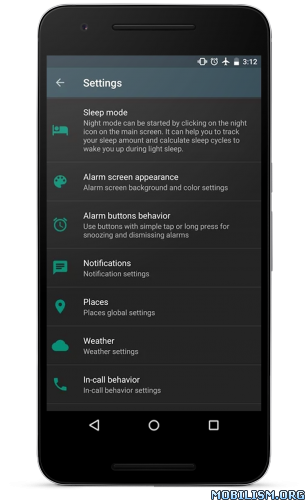
To avoid oversleep you need to go to bed timely. AMdroid will let you know with a bedtime (sleep advise) notification if it’s time to fall asleep in order to wake up fresh and have a better morning routine. When sleep mode is activated sleep cycle calculation can be started to follow your sleep patterns and have an easier awakening in the morning. With Stats, you can also track how much time you spend sleeping.
• Places
Make your alarm clock location-aware, so your alarms will only go off if you are in a certain area. Heading out for a business trip or just sleep over somewhere else for the night? Your morning routine will probably change, so AMdroid will temporarily disable your regular alarm profile automatically.
• Stats
Ever wondered how much time you spend snoozing? AMdroid Smart Alarm Clock will show you statistics, you can analyze and use to fine-tune your alarm settings.
• Nothing better than an afternoon siesta
Tiredness overcame and feel drowsy? If you are sleepy or half asleep, use the countdown alarm function as a timer for your afternoon doze. Set the timer, and the alarm will go off if it has elapsed, and you won’t oversleep. Awaken energized and lively.
Let’s fight oversleeping and build the best smart alarm clock app. Send your ideas or report issues to [email protected]
*Important notes*
If your device supports a battery saving function, please add AMdroid Smart Alarm Clock to the whitelist, as it may cause problems with alarm clock apps.
The app is free and Ad supported (after the alarm); purchase Premium Upgrade to remove Ads.
★★★ MOD Premium: ★★★
– PREMIUM features Unlocked;
– Ads Removed;
– All ads calls from Activity removed;
Credit: Nurik
What’s New:
• New: Improved compatibility with newer Android versions.
• Fix: Fixed issues with Places.
• Fix: Fixed issues with Calendar integration.
• Change: Due to system-level changes, you can no longer turn off Do Not Disturb mode or override its settings on devices running Android 15 and above.
• Change: The minimum supported version is Android 6.0.
• Minor bug fixes and improvements.
This app has no advertisements
More Info:https://play.google.com/store/apps/details?id=com.amdroidalarmclock.amdroid
Download Instructions:
https://ouo.io/0x08Cy
Mirrors:
![Xodo PDF Reader and Editor v7.2.1 [Pro] [Mod] APK](;https://apkmagic.com.ar/wp-content/uploads/2021/05/27/Xodo-PDF-Reader-and-Editor-v707-Premium.png "Xodo PDF Reader and Editor v7.2.1 [Pro] [Mod] APK")
![Root Checker Pro v1.6.4 [Paid] [Patched]](http://images.mobilism.org/?dm=KAR3NEU0 "Root Checker Pro v1.6.4 [Paid] [Patched]")

