AdGuard Ad Blocker v4.14.0 [Final] [Premium] [No-Root] [Mod Extra]
Requirements: 9+
Overview: THE WORLD’S MOST ADVANCED AD BLOCKER!
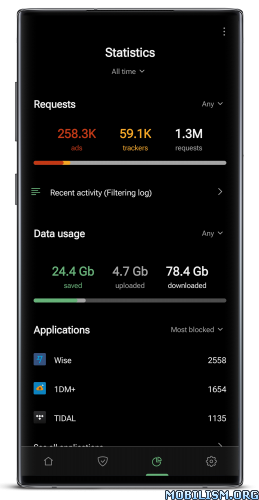
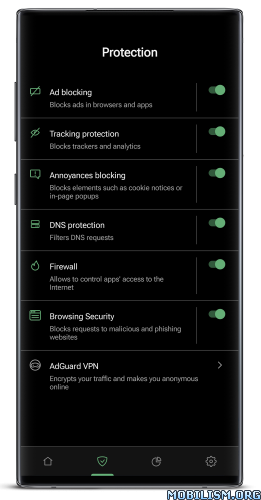
AdGuard is the best way to get rid of intrusive ads and online tracking, and to protect your device from malware.
Make your web surfing faster, safer and more comfortable with AdGuard!
AdGuard is a unique no root ad blocker for Android that removes ads in apps and browsers, protects your privacy, and helps you manage your apps
Easy to set up and get going, but powerful and highly customizable — it has everything you’ll ever need from an Android adblock tool, and it works both on rooted and unrooted devices.
Why choose AdGuard?
Blocks ads everywhere
Block throughout the whole system. This includes video ads and ads in your favorite apps, browsers, games, and on any website you can imagine. Dozens of ad filters are available to you and are updated on a regular basis, guaranteeing the best filtering quality.
Cares about your privacy
We value the privacy of your personal data above anything else. With AdGuard, you will be safe from online trackers and analytics systems that lurk on the web trying to steal your sensitive information.
Saves your traffic
More ads blocked means fewer ads loaded. Fewer ads loaded means more traffic saved. Simple math by AdGuard! Download the apk file, install the app and spend your traffic on things you like instead of wasting it on voracious ads.
You stay in control
It is your device, after all, and you decide what gets filtered and what doesn’t. A wide range of settings — from basic to ‘pro’ — as well as an Apps Management tool will help you customize the filtering to your liking.
Try AdGuard ad blocker for Android apps for free and feel the difference! Once you go with our app on your tablet or mobile phone, you’ll never want to go back.
What’s New:
AdGuard for Android v4.14 is focused on improving compatibility and making ad blocking work seamlessly with the privacy tools you rely on every day.
A smarter Recent activity screen
Recent activity is becoming more flexible and customizable. With the upcoming filtering options, you’’ll be able to refine which network requests are displayed based on criteria such as applications, companies, event types, and statuses. This makes it easier to focus on the information that matters most and navigate large activity logs more efficiently, giving you greater control over how network activity is presented.
Better filtering
Filtering for browser proxy and VPN extensions has also been significantly improved. Previously, traffic from these extensions had to be downgraded to HTTP/1 for filtering. AdGuard now supports full filtering over HTTP/2 and HTTP/3, providing better compatibility, more reliable protection, and a smoother browsing experience without sacrificing performance.
Changelog
Improvements
Added a new button to export filtering log;
Added a new version available notification as a red dot above the AdGuard icon;
Added status indicators for apps in the App Management section;
Added AdGuard to the list of Device administration apps in system settings;
Allowed encrypted fallback and bootstrap DNS servers;
Added the Search field on the Websites exclusions screen;
Added a filter to Recent activity to hide duplicate entries;
Implemented smart search for the Recent activity screen;
Fixes
Several issues in Recent activity (TLS details), including inconsistent wording and missing ClientHello and TLS version information;
The Add blocking rule button is incorrectly displayed for QUIC connections blocked by the Filter HTTP/3 option;
The router’s web interface is inaccessible after a reboot when the Wi-Fi gateway route is unexpectedly included in the VPN;
Screen rotation glitches in landscape mode when using video players in the private browser;
Holding down backspace in the Add blocking rule field does not trigger continuous character deletion;
AdGuard protection is not automatically enabled after reboot when using Always-on VPN;
Background playback doesn’t work in AdGuard’s YouTube Player;
AdGuard protection gets stuck in a restart loop;
CoreLibs (Filtering engine)
CoreLibs updated to v1.22.28;
DnsLibs (DNS filtering engine)
DnsLibs updated to v2.10.1;
Mod Info:
- Premium / Paid features unlocked;
- Disabled / Removed unwanted Permissions + Receivers + Providers + Services;
- Optimized and zipaligned graphics and cleaned resources for fast load;
- Debug code removed;
- Remove default .source tags name of the corresponding java files;
- Analytics disabled;
- Native Sentry code removed and disabled;
- Disabled startup screen;
- No patched watermarks;
- Languages: Full Multi Languages;
- CPUs: armeabi-v7a, arm64-v8a, x86, x86_x64;
- Screen DPIs: 120dpi, 160dpi, 240dpi, 320dpi, 480dpi, 640dpi;
- Original package signature changed;
- Release by Balatan.
This app has no advertisements
More Info:http://adguard.com
Download Instructions:
All-in-One Universal Mod:
https://ouo.io/9iqvfl
Mirrors:
https://ouo.io/cW9IjY
https://ouo.io/QQqisPq
https://ouo.io/731Xv8I
https://ouo.io/AGLZA2s
https://ouo.io/X5h6Fkz
arm64-v8a:
https://ouo.io/Il0Lnf
Mirrors:
https://ouo.io/aLYSQv
https://ouo.io/1BDkfO
https://ouo.io/Tw2yynT
https://ouo.io/N4tlVT
https://ouo.io/xiFPH6
armeabi-v7a:
https://ouo.io/qsqcNX
Mirrors:
https://ouo.io/Gw6ntIz
https://ouo.io/zbsm2a
https://ouo.io/vjs5Bb
https://ouo.io/v8fcXx
https://ouo.io/5Sc0RY
Mirrors:
https://ouo.io/YJy5bvN
https://ouo.io/WW2WQR
https://ouo.io/aYzh0j
https://ouo.io/2H82h1C
https://ouo.io/powomp
x86_x64:
https://ouo.io/k14kVe
Mirrors:
https://ouo.io/nyJlj3f
https://ouo.io/V46arEL
https://ouo.io/Z9c005
https://ouo.io/1c9PNT
https://ouo.io/5nwmpin


![Pix Material You Icons v9.3.Build [Patched]](https://images.mobilism.org/?dm=7ACYRVW7 "Pix Material You Icons v9.3.Build [Patched]")
